Control Scheme
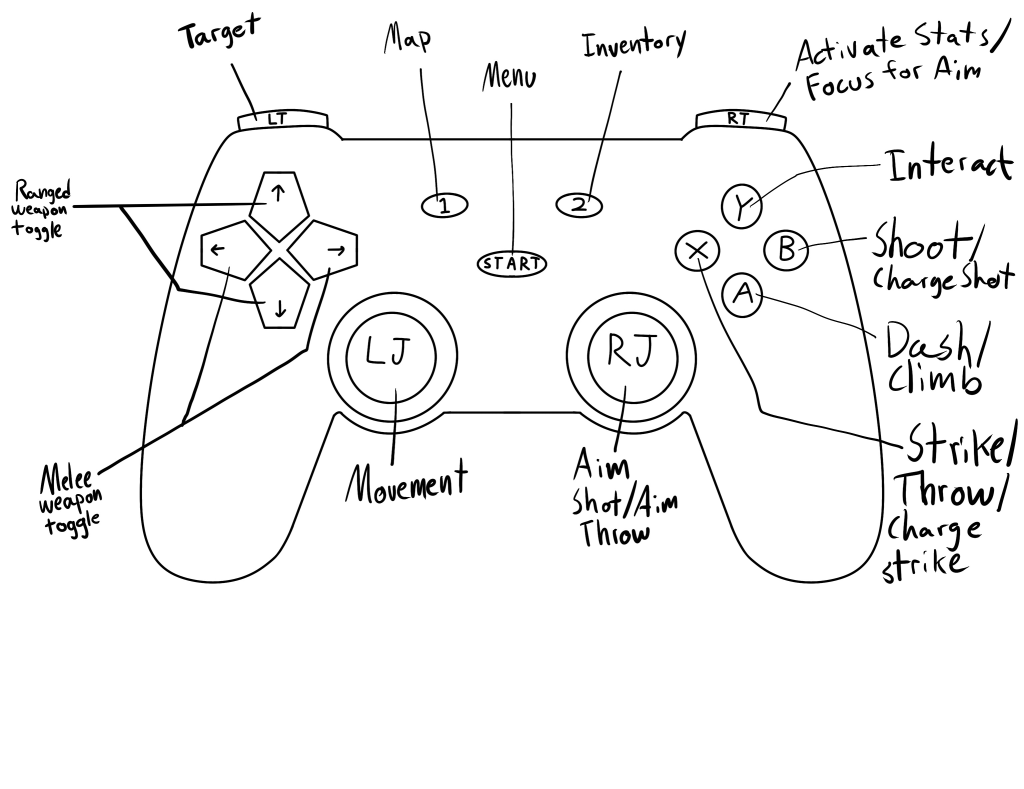
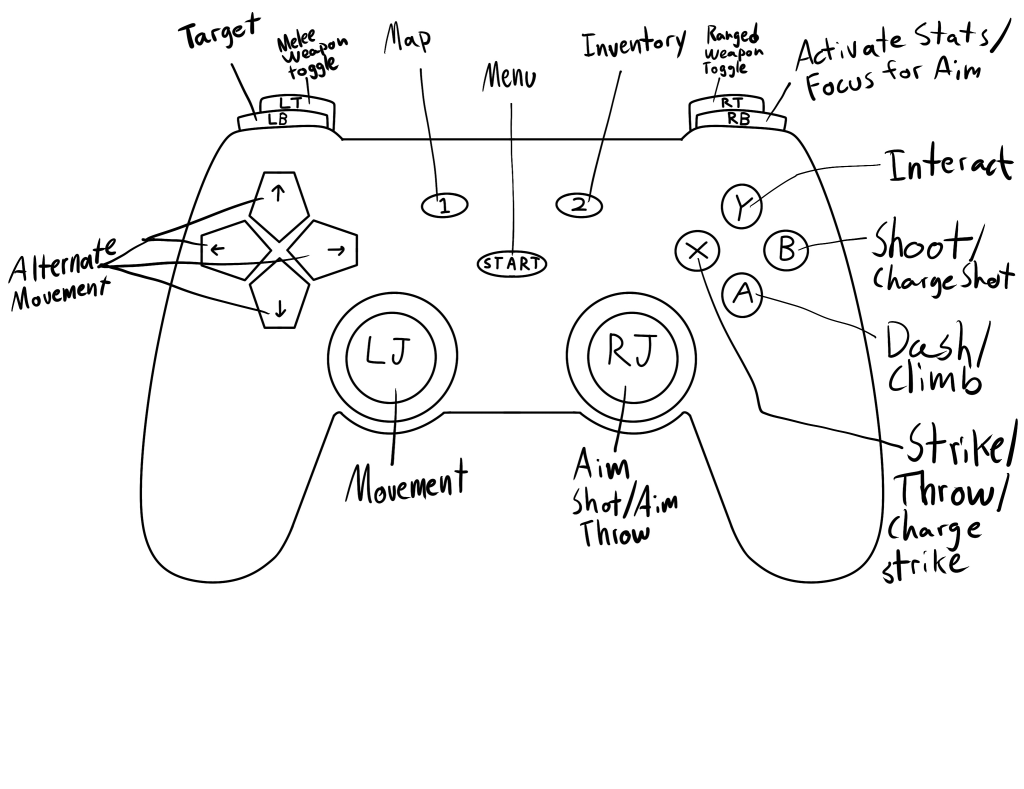
Since we’re past the introduction phase of the game and into where you’ll be getting familiar with all the controls, I might as well give a basic rundown of that system for how things look this early. I went with two versions of a Playstation-like controller for the template, one with 2 shoulder buttons and one with 4. While I prefer the one with 2 shoulder buttons for the layout, I have a feeling the one with 4 will be more preferable for people so we’ll see how that turns out later on.
Dash and Climb
A Button
Similar to Hyper Light Drifter, by facing a specific direction and hitting A, the Protagonist will dash in that direction. This includes traveling over platforms and pitfalls. I’d like to include an option to turn on and off continuous dash movement where if you’re holding the movement joystick in a direction, you’ll keep going after dashing. If you’re in front of a falling hazard after dashing, you won’t run off the side.
The A Button will also act to help you up and down climbable sections. I’m undecided if the Protagonist will just go straight up or down the whole distance in one motion, like in Hyper Light Drifter, or if you’ll lock onto a climbable section and move all four directions across it.
As you progress in the game, you’ll get certain upgrades, like being able to dash further or more frequently. You’ll also have combo options, like deflecting attacks and such. But that’s for another post.
Attack
X and B Buttons
These are the main combat buttons. B allows you to throw objects and fire ranged weapons. X lets you use melee weapons or fight with your bare hands. If your melee weapon isn’t available (breaking a temporary weapon, holding one that needs a power source, etc.), you’ll default to using your fists and if your ranged weapons are out of ammo, you can swap to another.
You can also charge up some ranged weapons but not all. You can charge up melee attacks and upgrade how strong these become.
Interact
Y Button
Pretty straightforward. When there’s something to interact with that doesn’t involve walking over it or attacking, you use this button. This selects topics in dialogue options. It activates triggers. And if you can’t interact with something at the moment, I think it would be neat to have a number of customizable gestures the Protagonist defaults to. These can be a simple stoic shrug, some stretches, brushing off his clothes, checking his gear, or maybe something silly like a dance.
Aiming Focus and Stats
For Option 1: Right Trigger. For Option 2: Right Bumper.
Right Joystick
Tapping the Top-Right Button for this will activate a stat pulse. All your indicators will show up on screen: health, enemy health, names of NPCS, ammo, damage to items, and even highlight anything on screen you’ve already interacted with.
Holding down the Top-Right Button will have the Protagonist point whatever they are holding to shoot or throw at a set direction. You then use the Right Joystick to point where to throw for accuracy, complete with a reticle showing the direction path. You can move while doing this in theory, though I’m not sure how easy that will be for players. Either way, you have to hit the B Button to finalize the action.
Targeting
For Option 1: Left Trigger. For Option 2: Left Bumper.
During or before combat, as long as an enemy is on screen, you can tap this button to auto-hone-in on that enemy for all attacks. You’ll still hit any enemies that get in the way but the targeted enemy will be the focus. You’ll automatically target the nearest enemy but you can change this in settings to focus on the weakest or strongest enemy as well. If you tap the button twice, it’ll deactivate. And if you hold it down, it’ll cycle through the nearest enemies for you to choose from while slowing the game down a bit to give you time to choose.
This will play into the combat skill-tree as focusing one enemy will not guarantee hitting that enemy. Your aim will improve as you get better at different weapons so that eventually, when you target an enemy and use a ranged weapon, it’ll basically always hit (as long as something isn’t in the way).
General Movement
Left Joystick
For Option 2: Also Arrow Buttons
Pretty straightforward. You can move in all eight direction using the Left Joystick. You have a set speed and if you’re turning 180 degrees, you’ll enter a pause animation as the Protagonist turns. You can choose to use the arrow buttons for this as well if going with the Option 2 approach.
Weapon Cycling
For Option 1: Arrow Buttons. For Option 2: Left Trigger and Right Trigger.
I like using the Left and Right Arrow Buttons to swap through melee weapons you have available and the Up and Down Arrow Buttons to swap through ranged weapons. But depending on how comfortable that would be for players, it can also be the Left Trigger for melee swap and Right Trigger for ranged swap. Additionally, in the inventory menu, you can select and deselect what items/weapons are in the swapping options so you can have as many or as few to go through as you want.
Menu
Start Button
This acts as a pause screen to access options (audio, visual, controls, go to main menu, etc.) That’s about it.
Map and Inventory
1 Button and 2 Button
Hitting the 1 Button will take you to your map menu. This will let you see specific landmarks and potentially quick-travel along with placing markers.
Hitting the 2 Button will take you to the inventory menu. Here, you can see your loadout, all your tools and their ammo. It’ll show any particular items you’ve purchased (health packs, performance boosters, key items, etc.) and your virtual device. You can select the virtual device to go through its menu and you can customize all of your inventory for how you use it in the game.
While in these two menus, you can use the shoulder buttons to swap between them.
Some Quick Gameplay Ideas
Since we’re playing as a veteran, there’s going to be a sort of experience system. The more you use certain kinds of weapons, the better the Protagonist will perform with it (less damage to melee weapons, more damage caused by melee weapons, more accurate shots with ranged weapons, faster reload with ranged weapons, etc.). There will be different kinds of weapons in each plaza to practice with and you can earn respect from different cultural workers at each by demonstrating enough capability with those weapons.
I also like to think that each cultural weapon will be associated with a technique and every time you master a weapon, you unlock another technique (stealthier movement, faster movement, additional combat moves, etc.)
 Tris' Thoughts
Leave a comment